更新时间:2024-08-13
There are two ways to generate AR Invoice:
1.Invoice Combine Mode, under this mode, billing team can combine all invoices of one customer into one invoice (invoice currency must be the same)
2.Normal Invoice Mode, under this mode, the invoice is generated directly from Master or House.
Users must decide which mode they are going to use before they use the system. Once the mode is selected, it can be changed.
Below will only demonstrate Invoice Combine Mode
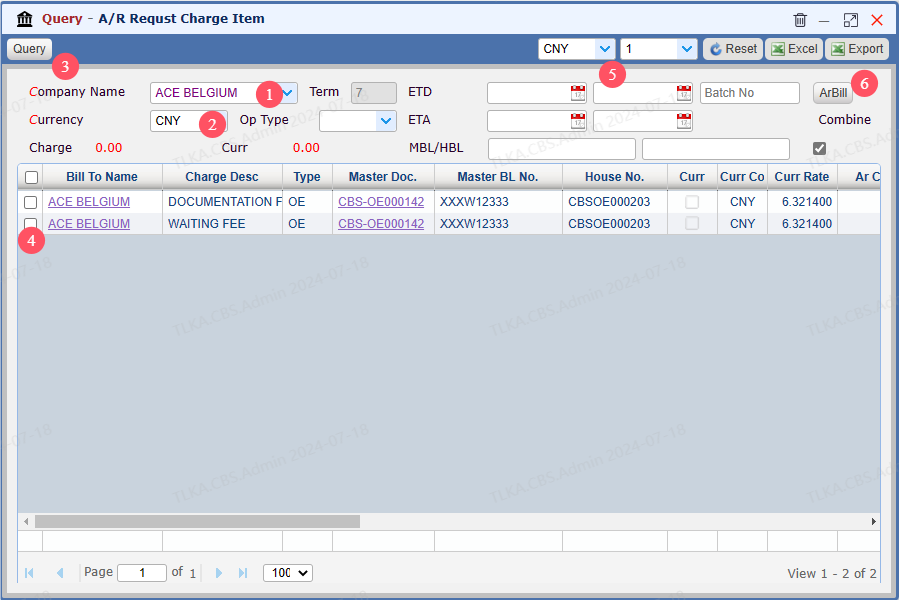
Go To Menu 【A/R > AR Request Invoice】 |
Select Criteria and Query, then Bill the invoice 1. Select the company name 2. Select Currency 3. Click 【Query】 4. Select the charge items you want to combine into one invoice 5. If you are going to issue invoice with foreign currency, select the currrency and the exchange rate 6. Click 【Bill】 to generate the invoice
|